

One browser per profile for AI agents on Hyprland
Updated at October 6, 2026
How I split Brave profiles into separate processes on Omarchy, with Btrfs reflink, one CDP port per profile and a Quickshell link picker.
I use Brave with three profiles: personal, my job, and the university where I teach. I keep each Brave profile on its own Hyprland workspace. Once I started asking AI agents to work on pages where I am logged in, my workflow started to break.
There were two problems:
- A link opened from the terminal landed in whichever Brave window had focus last, often in the wrong profile.
- The agent opened the page in a profile without my login and failed halfway through the task.
My current setup runs each profile as its own Brave process. Each process has its own data directory, its own debugging port and its own native messaging host. A Quickshell picker decides which profile opens each link.
Brave is the browser I use, but everything here works for any Chromium-based browser, such as Chrome, Edge and Vivaldi. The flags and the internal files are the same.
flowchart LR
  accTitle: Path from a link or an agent to the right Brave profile
  accDescr: Links from the foot terminal and other applications go through the Quickshell picker, which opens the chosen profile. Agents reach each profile through its CDP port or through the native messaging host configured in the profile data directory.
  FOOT["foot<br/>Ctrl+Shift+O"] --> PICKER["Quickshell picker<br/>keys 1, 2 and 3"]
  XDG["xdg-open<br/>other apps"] --> PICKER
  PICKER --> BP["brave-personal<br/>CDP 9222"]
  PICKER --> BW["brave-bliss<br/>CDP 9223"]
  PICKER --> BU["brave-unicesumar<br/>CDP 9225"]
  AXI["chrome-devtools-axi"] -->|CDP| BW
  CW["Claude Code<br/>~/.claude-w"] -->|native messaging| BW
  CP["Claude Code<br/>~/.claude"] -->|native messaging| BP
What I did not know about Chromium
Brave is based on Chromium, and Chromium runs a single main process per data directory (--user-data-dir). The profiles behind the avatar button are subfolders of that same directory, such as Default, Profile 1 and Profile 2. To the operating system, the three profiles are one program.
The data directory holds a SingletonLock and a SingletonSocket. When I run brave https://example.com with Brave already open, the new process finds the lock, sends the URL through the socket to the running process and exits. The main process opens the tab in the window it considers active.
Passing --profile-directory="Profile 1" does not change this, because the command still goes to the same process. This was the root of the problem. As long as the three profiles lived in the same data directory, every external tool would talk to the same process.
Focus across workspaces in Hyprland
Hyprland is a tiling Wayland compositor written in C++. It does not minimize windows. Each window lives on a numbered workspace, and I switch workspaces from the keyboard.
Omarchy, the Arch Linux and Hyprland setup I use, turns on misc:focus_on_activate. With it on, when an application asks for activation, Hyprland takes you to its window. That is bad for browser automation, because the agent steals the keyboard while I am typing somewhere else.
I turned it off in ~/.config/hypr/looknfeel.lua:
hl.config({
  misc = {
    focus_on_activate = false,
  },
})
With the option off, Hyprland only marks the window as urgent. So I do not miss it, a script reads the Hyprland event socket and shows a notification with the workspace that asked for focus:
socat -U - "UNIX-CONNECT:$sock" | while IFS= read -r line; do
  case $line in
    urgent\>\>*) notify_for "${line#urgent>>}" & ;;
  esac
done
This fixes focus. The wrong profile is still wrong, because it is still the same Brave process.
One data directory per profile with Btrfs reflink
For each profile to become its own process, each one needs a different --user-data-dir:
~/.config/brave-personal~/.config/brave-bliss~/.config/brave-unicesumar
A regular copy would duplicate several GB of cache, history, IndexedDB and extensions. My original Brave directory had 6.1 GiB.
Omarchy installs the system on Btrfs. Btrfs is a copy-on-write file system and supports reflinks. A reflink creates a new file that points to the same blocks as the original. Data is only duplicated when one side changes a block.
The migration script ran with Brave closed. For each profile it copies, with cp -a --reflink=always, the shared files from the original directory, such as Local State, plus that profile’s subfolder. Then it edits the copy’s Local State so it lists only that profile. The work copy, for example, gets the Profile 1 subfolder:
cp -a --reflink=always \
  ~/.config/BraveSoftware/Brave-Browser/"Profile 1" \
  ~/.config/brave-bliss/"Profile 1"
One day after the migration, btrfs filesystem du shows the result:
     Total   Exclusive  Set shared  Filename
   4.25GiB   458.43MiB     3.28GiB  /home/satin/.config/brave-personal
   1.41GiB   125.82MiB     1.00GiB  /home/satin/.config/brave-bliss
   1.48GiB    86.09MiB     1.08GiB  /home/satin/.config/brave-unicesumar
The three directories add up to 7.1 GiB, but only 670 MiB are blocks exclusive to them. The rest is still shared with the original directory, which I kept as a backup.
One CDP port per profile
The Chrome DevTools Protocol (CDP) is Chromium’s debugging protocol. It exposes a WebSocket API to read the DOM, run JavaScript, watch the network and take screenshots. Tools like Playwright and chrome-devtools-axi drive the browser through it.
To open that port, the browser has to start with --remote-debugging-port. Since Chrome 136, this flag is ignored on the default data directory. It only works with a non-default --user-data-dir, and Brave follows the same Chromium rule. Splitting the directories was required for this too.
Each profile got a script in ~/.local/bin. The work one looks like this:
#!/usr/bin/env bash
exec /usr/bin/brave \
  --user-data-dir="$HOME/.config/brave-bliss" \
  --profile-directory="Profile 1" \
  --remote-debugging-port=9223 \
  "$@"
The personal one uses Default and port 9222. The university one uses Profile 2 and started on port 9224.
Port 9224 had a conflict. The chrome-devtools-axi bridge listens on 9224 by default. Since it started first, Brave could only open the port on IPv6 ([::1]:9224), and anything calling 127.0.0.1:9224 talked to the bridge instead of the browser. I moved the university profile to 9225.
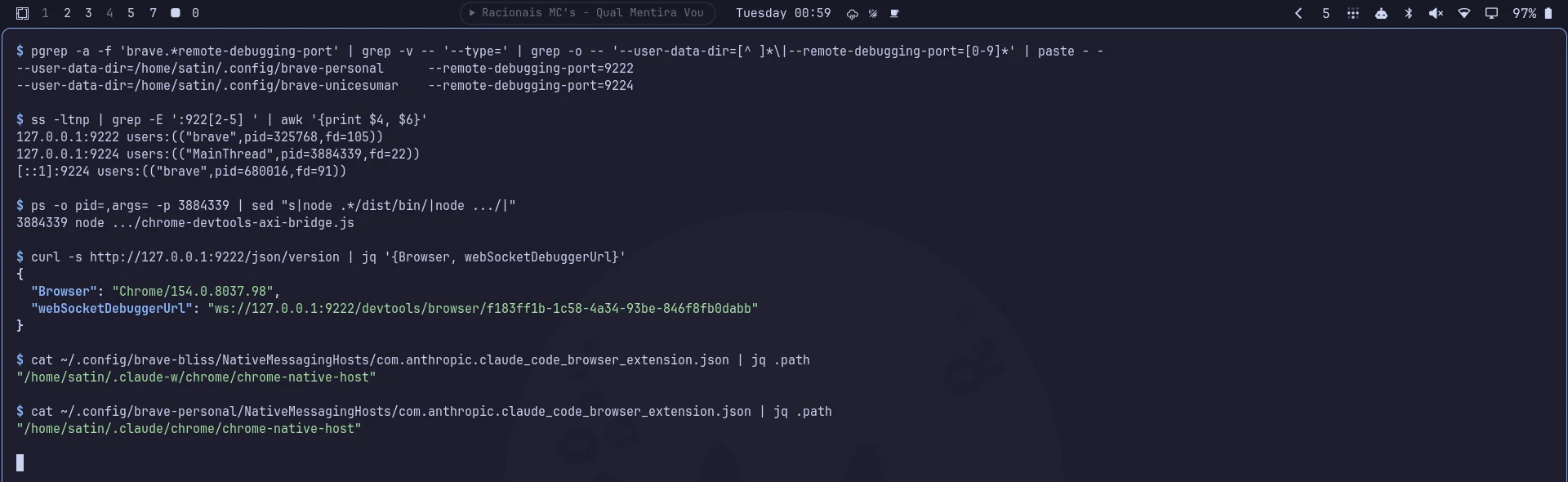
With separate ports, I pick the profile by URL:
CHROME_DEVTOOLS_AXI_BROWSER_URL="http://127.0.0.1:9223" chrome-devtools-axi pagesThe CDP port has no authentication. Any process running as my user can control the three logged-in profiles, including the work one. The port only listens on localhost, but keep that in mind before copying this setup.
The Claude extension and native messaging
The Claude browser extension does not use CDP. It talks to Claude Code through native messaging. The browser starts a local program described in a JSON manifest and exchanges messages with it over standard input and output.
On Linux, Chromium looks for these manifests in NativeMessagingHosts/, inside the data directory. With one directory per profile, each instance can point to a different Claude Code. I use a separate config directory for work (~/.claude-w), and the brave-bliss manifest points to it:
{
  "name": "com.anthropic.claude_code_browser_extension",
  "path": "/home/satin/.claude-w/chrome/chrome-native-host",
  "type": "stdio"
}
The personal and university profiles point to ~/.claude.
One point is still open. The bridge sockets all live in /tmp/claude-mcp-browser-bridge-satin/, named after the host PID and not the config directory. I have not tested two Claude Code sessions at the same time, one per profile, to confirm each one picks the right socket.
Link picker with Quickshell
With three separate browsers, I still had to decide where a link clicked outside them should go.
The Omarchy interface, like the bar and the menus, is built with Quickshell. Quickshell is a toolkit for desktop components written in QML (Qt Modeling Language) on Wayland. The window becomes a compositor layer through the wlr-layer-shell protocol, above the other windows.
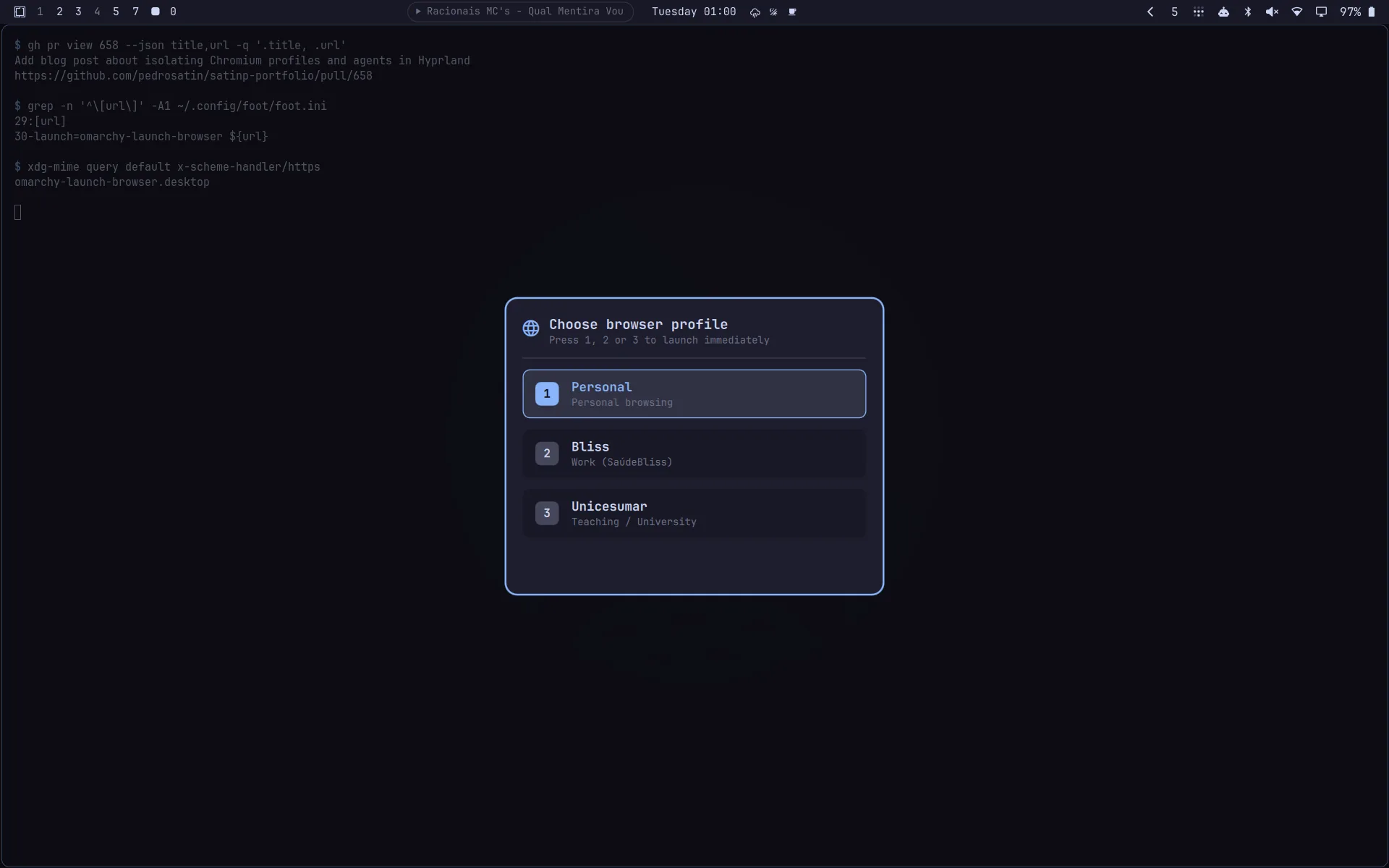
The first attempt used Walker, the Omarchy app launcher. It looked different from the rest of the system. The second used omarchy-menu-select, which already matches Omarchy, but it required Enter after the number. I wanted to press 1, 2 or 3 and have the link open right away.
I ended up writing my own picker at ~/.config/omarchy/browser-picker/shell.qml. This is the part that decides what to open:
ShellRoot {
  id: shell
  property string url: Quickshell.env("PICKER_URL") || ""

  PanelWindow {
    anchors { top: true; bottom: true; left: true; right: true }
    color: "transparent"
    WlrLayershell.layer: WlrLayer.Overlay
    WlrLayershell.keyboardFocus: WlrKeyboardFocus.Exclusive

    Item {
      id: winRoot
      focus: true

      function select(browserName) {
        var args = ["/home/satin/.local/bin/" + browserName];
        if (shell.url.length > 0) args.push(shell.url);
        Quickshell.execDetached(args);
        close();
      }

      function close() {
        Quickshell.execDetached(["sh", "-c", "pkill -f 'quickshell -p .*browser-picker'"]);
      }

      Keys.onPressed: function(event) {
        if (event.key === Qt.Key_1) winRoot.select("brave-personal");
        else if (event.key === Qt.Key_2) winRoot.select("brave-bliss");
        else if (event.key === Qt.Key_3) winRoot.select("brave-unicesumar");
        else if (event.key === Qt.Key_Escape) winRoot.close();
      }
    }
  }
}
The full file also has the card with the three options, arrow key navigation and mouse clicks. Since the menu sits on the Overlay layer with exclusive keyboard focus, the key press does not leak into the window behind it.
Links from the terminal and the rest of the system
foot is the terminal I use on Omarchy. The Ctrl+Shift+O shortcut belongs to foot itself and turns on URL mode. It tags each visible link with a letter, and typing the letter opens the link.

By default foot opens the link with xdg-open. I changed it to my script in ~/.config/foot/foot.ini:
[url]
launch=omarchy-launch-browser ${url}
omarchy-launch-browser is the command Omarchy uses to open the browser, including on Super+Shift+B. I created my own version in ~/.local/bin, which comes first in PATH. It hands the URL to the QML through an environment variable:
export PICKER_URL="$url"
PICKER_FILE="$HOME/.config/omarchy/browser-picker/shell.qml"
pkill -f "quickshell -p .*browser-picker" 2>/dev/null || true
exec quickshell -p "$PICKER_FILE"
For links from other applications, I created omarchy-launch-browser.desktop and registered it as the default browser:
xdg-mime default omarchy-launch-browser.desktop x-scheme-handler/http
xdg-mime default omarchy-launch-browser.desktop x-scheme-handler/https
xdg-mime default omarchy-launch-browser.desktop text/html
Inside Brave, a small extension adds an “Open in profile” entry to the right-click menu. It sends the URL through native messaging to a script that calls brave-personal, brave-bliss or brave-unicesumar. When I am reading something in the personal profile that belongs to work, I open it in the other profile without copying the URL.
The images in this post came from the full flow. I pressed Ctrl+Shift+O in the terminal on workspace 9, typed the link letter and picked 1. The tab opened in the personal Brave, which lives on workspace 10, and focus stayed on the terminal with the notification in the corner.