

Node.js dependencies: dependencies, devDependencies and peerDependencies
Updated at September 18, 2026
How to choose the right package.json section, publish smaller libraries and handle major version incompatibilities.
Each section answers a different question about a dependency:
dependenciescontains what the published code needs at runtime.devDependenciescontains tools used to develop, test and package the code.peerDependenciesdeclares an integration with a package supplied by the host project.
flowchart LR
accTitle: package.json sections
accDescr: Diagram of the three package.json sections. dependencies follows production code, devDependencies serves development and peerDependencies describes a library supplied by the host project.
A["<b>dependencies</b><br/><br/>The consumer needs<br/>this package to<br/>run the application.<br/><br/><div class='diagram-chip diagram-chip--deps'><code>dependencies: {<br/> express: ^5.1.0<br/>}</code></div><br/><b>Runtime / production</b>"]
B["<b>devDependencies</b><br/><br/>The team needs<br/>this package to<br/>build and test.<br/><br/><div class='diagram-chip diagram-chip--dev'><code>devDependencies: {<br/> vitest: ^4.1.11<br/>}</code></div><br/><b>Build / test / lint</b>"]
C["<b>peerDependencies</b><br/><br/>A library expects<br/>the host project<br/>to provide the package.<br/><br/><div class='diagram-chip diagram-chip--peer'><code>peerDependencies: {<br/> react: ^18.0.0<br/>}</code></div><br/><b>Plugin / host</b>"]
A ~~~ B ~~~ C
Diagram of the three package.json sections. dependencies follows production code, devDependencies serves development and peerDependencies describes a library supplied by the host project.
What npm installs
Consider a project that uses Astro. The server and build process need the astro package, so it belongs in dependencies for this project. Vitest only runs tests and Oxlint only checks code during development. Both belong in devDependencies.
{
  "dependencies": {
    "astro": "^7.2.4"
  },
  "devDependencies": {
    "vitest": "^4.1.11",
    "oxlint": "^1.80.0"
  }
}
When someone installs the application to run it, the environment needs astro. Test and lint tools can stay out of it. npm installs both groups by default in a local project, and a production install can omit development packages with npm install --omit=dev.
The distinction also affects the package contract. Putting a test library in dependencies tells consumers that production code needs it. If the program imports that library while it runs, the declaration is correct; if it is only used for tests and development, use devDependencies.
dependencies belongs to runtime code
Use dependencies when published code imports a package while it runs. An Express server that calls express() needs to declare express. A package that validates data with Zod in an exported function needs to declare zod.
{
  "name": "invoice-service",
  "dependencies": {
    "express": "^5.1.0",
    "zod": "^3.23.0"
  }
}
The consumer should not need to guess these requirements or install them manually. npm reads the field and builds the tree required to run the package.
The usual command is:
npm install expressnpm writes the package name and a version range to package.json. It also records the resolved version and integrity in package-lock.json. The lockfile fixes the tree installed by the project. The range in the manifest communicates which future versions the package accepts.
devDependencies stays on the maintenance side
Build, test, lint and documentation tools usually belong in devDependencies. They help create the package. Consumers receive the build result and do not need every tool used to produce it.
{
  "devDependencies": {
    "typescript": "^5.6.0",
    "vitest": "^4.1.11",
    "oxlint": "^1.80.0"
  },
  "scripts": {
    "build": "tsc",
    "test": "vitest run",
    "lint": "oxlint src"
  }
}
Add these packages with npm install --save-dev package or the shorter npm install -D package.
peerDependencies describes the host project
A peer dependency shows up when a library integrates with a tool already chosen by the application. React plugins, bundler adapters and framework components are common examples.
Imagine a library called form-kit that renders React components. It uses React’s API, yet it should not install a separate copy of React for every application. The host app already owns a version, manages its upgrades and provides the package.
{
  "name": "form-kit",
  "version": "2.4.0",
  "dependencies": {
    "zod": "^3.23.0"
  },
  "devDependencies": {
    "typescript": "^5.6.0",
    "vitest": "^2.1.0"
  },
  "peerDependencies": {
    "react": "^18.0.0"
  }
}
This declares that form-kit supports React 18.x and expects React to exist in the project that installs it. The library can still list React in devDependencies to run local tests. The repository can test its code without transferring React installation to consumers.
Since npm 7, npm tries to install peer dependencies automatically. When it cannot form a compatible tree, it reports the conflict. The error often shows up during npm install, before any application code runs.
What happens when a major version breaks the range
SemVer uses the MAJOR.MINOR.PATCH format. An incompatible change increases the major number. The range ^2.4.0 accepts versions from 2.4.0 up to, but not including, 3.0.0. It therefore rejects 3.0.0.
Suppose an app updates to host-ui@3.0.0 while ui-addon@4.0.0 still declares:
{
  "peerDependencies": {
    "host-ui": "^2.4.0"
  }
}
When the plugin is installed, npm finds two incompatible statements. The app requires host-ui@3.x. The plugin declares support only for host-ui@2.x. The result can be an ERESOLVE error.
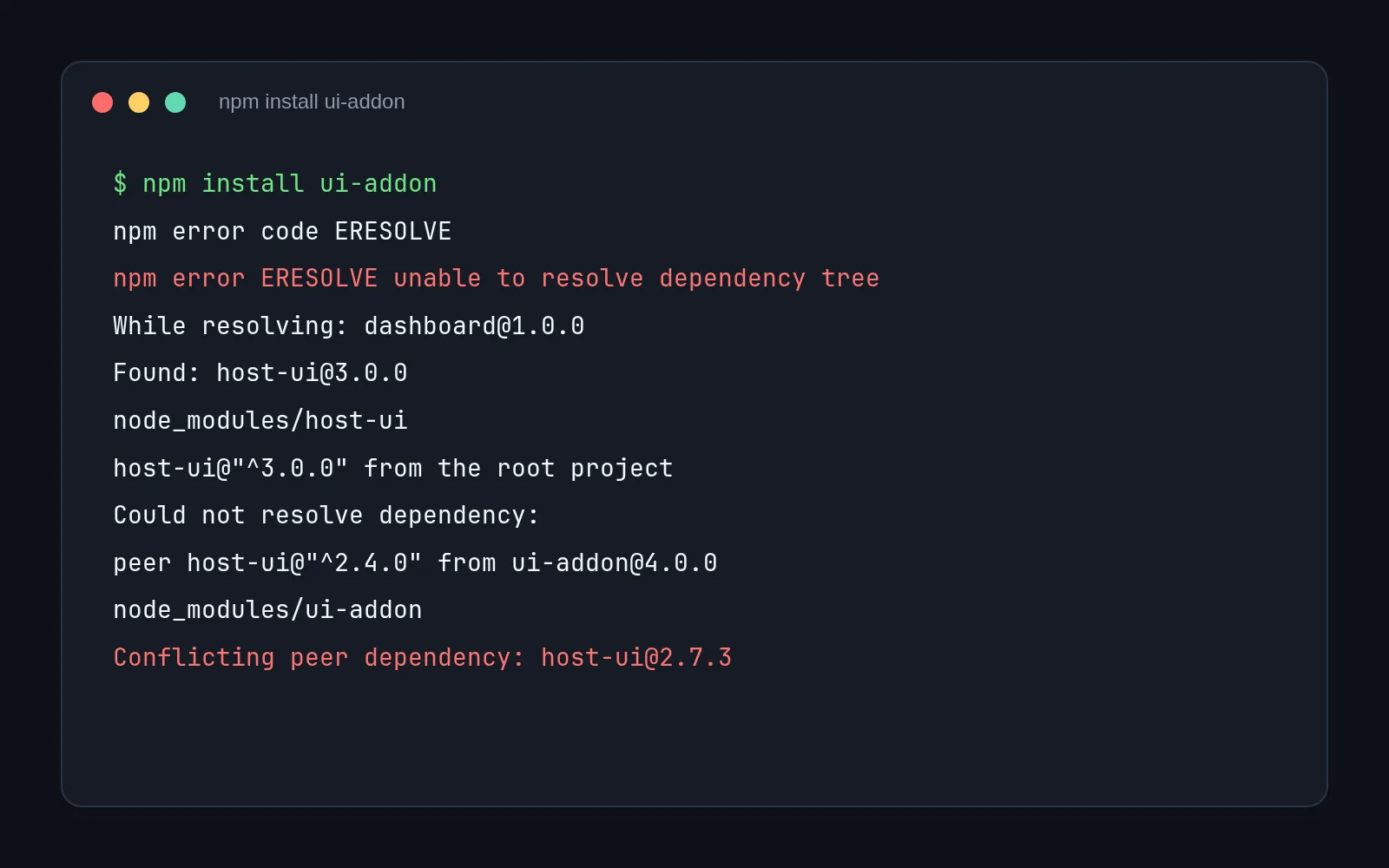
The command appears on line 1. Line 2 identifies the ERESOLVE code, and line 3 summarizes that npm could not resolve the dependency tree. Line 4 shows the project being resolved; line 5 records host-ui@3.0.0, and line 7 says that this version came from the root project. On line 8, npm announces the dependency it could not resolve; line 9 shows that ui-addon@4.0.0 requires host-ui in the ^2.4.0 range. Line 11 records the conflicting version that was found.
The next step depends on the plugin’s code. If the API remains compatible, the maintainer can test version 3 and widen the range:
{
  "peerDependencies": {
    "host-ui": "^2.4.0 || ^3.0.0"
  }
}
If version 3 requires changes to the plugin, the maintainer needs to update the implementation, test both combinations and publish a version that documents the new support. A major version in host-ui does not automatically require a major version in the plugin. The plugin’s version depends on changes to its own API and contract.
Reducing the range to "*" or using --legacy-peer-deps hides the conflict. The command may finish, yet the application can load an API the plugin does not understand. npm’s error is information about the contract. The code and tests decide whether the versions are compatible.
A library can list one package in two sections for different reasons. React can appear in peerDependencies to declare the consumer contract and in devDependencies to run the repository’s tests; it should only go into dependencies when published code needs it at runtime.